| Support Category: Course Information Inquiry | Evaluation Inquiry |
| Specialist Notes: |
To find the date on which a user's final assessment is unlocked, kindly follow these steps:
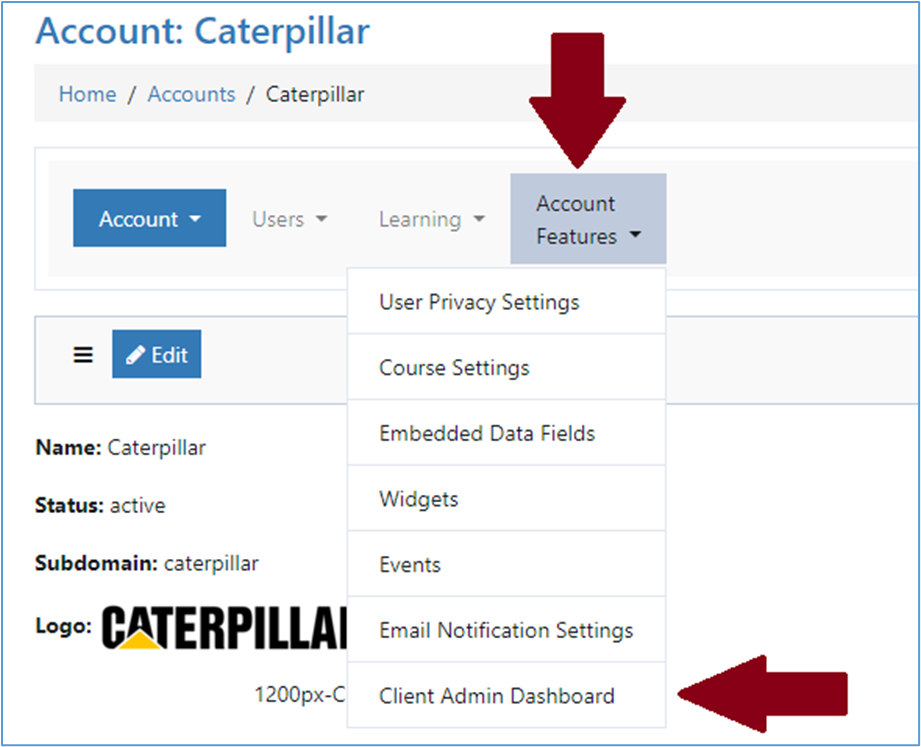
After logging into the Admin Account for the domain the user is located in, you will want to find the Client Admin Dashboard under Account Features.
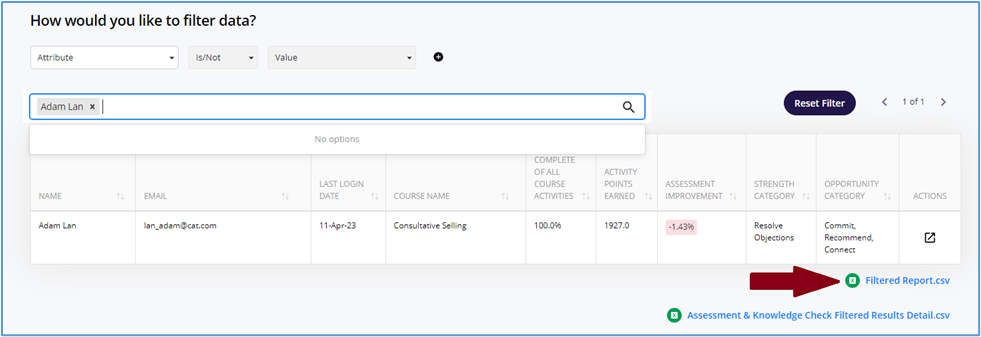
This will open a new tab. Scroll down to the search bar to filter the data and enter the user's name. For this example, Adam Lan is used. To the right of the search results, find Filtered Report.csv. This will download a CSV file to your computer that will open an Excel Spreadsheet upon clicking it.
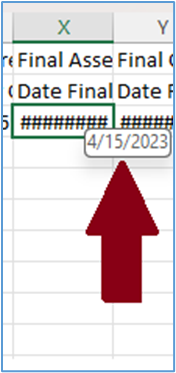
Find the column with the Final Assessment Date. Kindly note that this column might be populated by ######. In this case, you will have to hover your mouse over the hashes to get the date. In this example, the date for the Final Assessment is 04/15/2023.
IMPORTANT! If you happen to receive a user who pushes back or insists on taking the Final Assessment earlier than it is scheduled, please refer to the following SR. |
| Standard Response: |
Thank you for your patience, [INSERT USER'S NAME]!
After looking further into your inquiry regarding your Final Assessment, kindly note that it will become available to take on [INSERT DATE LISTED ON CSV FILE].
